Waybills
Waybills
1. Purpose
The “Waybills” section is designed to generate waybills with automatic completion of data related to the vehicle, driver, organization, trips, mileage, fuel, and calculated indicators.
This functionality is added to the “Fleet” module as a separate section. In this section, the user can generate a waybill, select a template, specify a period, fill in mandatory details, and enter additional data required for automatic document completion.
2. Section Location
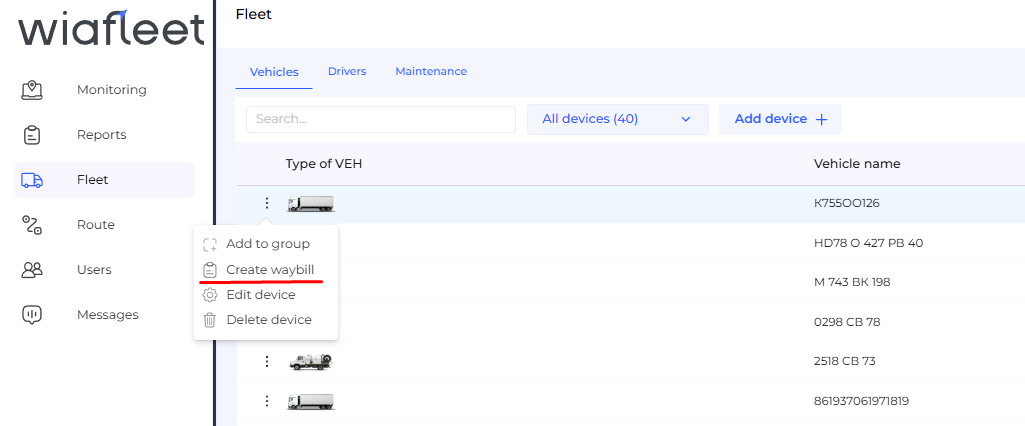
The “Waybills” section is located inside the “Fleet” module. It should allow the user to generate a waybill for the selected vehicle and enter additional data required to complete the document.
3. Main Features
The section should support the following features:
- generating a waybill for the selected vehicle;
- selecting a waybill template;
- selecting the reporting interval;
- specifying the series and number of the waybill;
- automatic completion of organization data;
- automatic completion of vehicle data;
- automatic completion of driver data;
- using trip data;
- using odometer data;
- entering data for wage calculation;
- downloading the generated document in XLSX or Word format.
4. Data for Automatic Completion
To generate a waybill, data from several sources is used: the organization card, vehicle card, driver card, trip data, counters, and parameters specified by the user when generating the document.
| Data group | What is used | Source |
|---|---|---|
| Organization | Organization name | Company linked to the user |
| Vehicle | Make, model, fuel, counter data | Vehicle card and report data |
| Driver | Full name, driver’s license details, SNILS | Driver card linked to the vehicle |
| Trips | Start, end, mileage, initial and final location | “Trips” table from the service report |
| Wage calculation | Rate per kilometer and rate per hour | Entered by the user when generating the waybill |
5. Organization Data
The organization name is automatically inserted into the waybill. The organization is defined as the company linked to the user.
6. Vehicle Data
Vehicle data is added to a new “Characteristics” section in the vehicle settings. This data is used for automatic waybill completion and is displayed in the vehicle information in the “Fleet” section when the vehicle is opened.
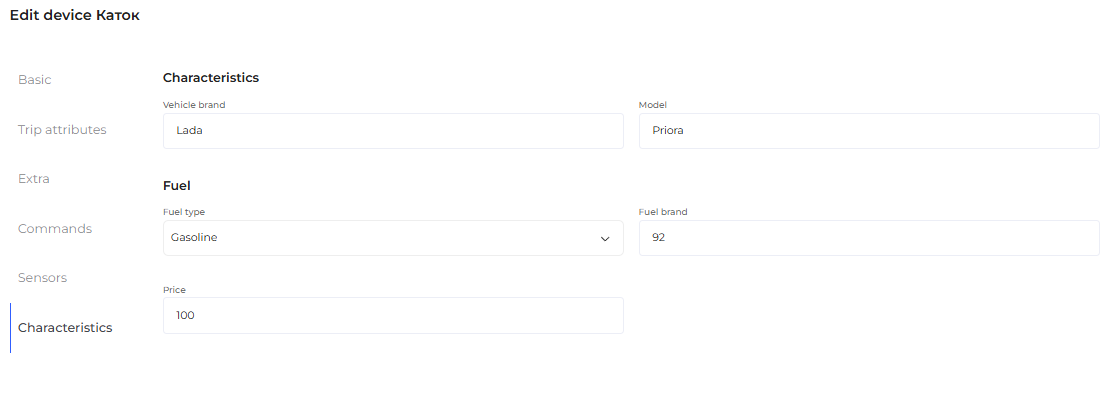
The following fields should be available in the “Characteristics” section:
- vehicle make;
- vehicle model.
6.1. “Fuel” Section
The vehicle characteristics should also include a “Fuel” section.
| Field | Description |
|---|---|
| Fuel type | Dropdown list: gasoline, diesel fuel, gas. |
| Fuel grade | Free-text field for specifying the fuel grade. |
| Cost per 1 liter | Cost of one liter of fuel. |
7. Driver Data
Driver data is used to complete the driver information block in the waybill. For this purpose, an additional “SNILS” field should be available in the “Drivers” section when creating or editing a driver.
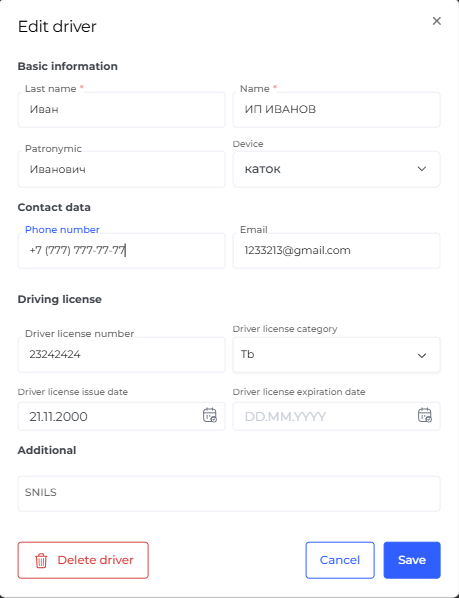
The following driver data may be inserted into the waybill:
- full name of the driver linked to the vehicle;
- driver’s license series and number;
- driver’s license issue date;
- SNILS.
8. Data for Wage Calculation
Data for wage calculation is entered by the user at the waybill generation stage. It is used to calculate the amount based on mileage and time on duty.
| Field | Purpose |
|---|---|
| Per mileage, rubles and kopecks | Rate for distance traveled. |
| Per hours, rubles and kopecks | Rate for working time. |
9. Generating a Waybill
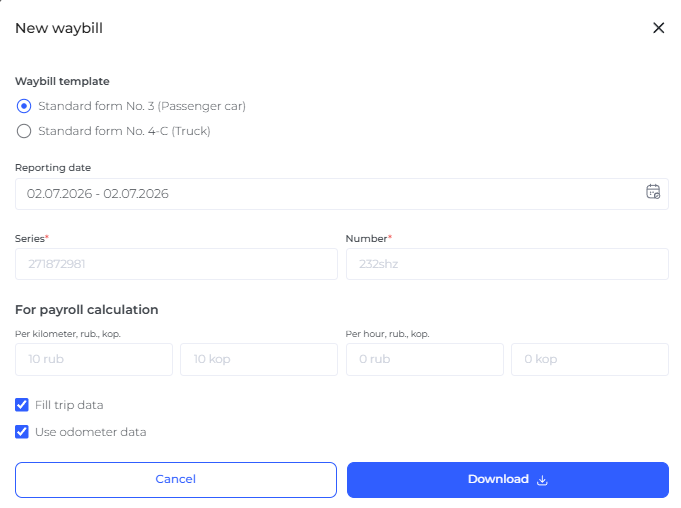
When the user clicks the “Generate Waybill” button in the vehicle card, a modal window opens. In this window, the user sets the document generation parameters.
| Parameter | Description | Required |
|---|---|---|
| Waybill template | Selection of the waybill form. | Yes |
| Interval | The period for which the waybill is generated. The current date is selected by default, but the interval can be changed. | Yes |
| Series and number | Waybill details. | Yes |
| Fill in trip data | Option for filling trip data in the waybill. | No |
| Use odometer data | Option for using odometer data when completing the document. | No |
| Data for wage calculation | Rates per mileage and hours. | If required |
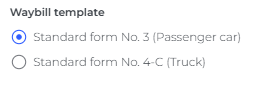
10. Available Waybill Templates
Several types of templates are available for completing waybills.
| Template | Purpose |
|---|---|
| Form No. 3 | Passenger car waybill. |
| Form No. 4-C | Truck waybill. |
After clicking the “Download” button, the waybill is automatically generated and downloaded in XLSX or Word format.
11. “Daily Summary” Table
The “Daily Summary” table is used to complete the general indicators of the waybill: period, vehicle, driver, fuel, mileage, engine hours, and calculated values.
| Indicator | Description |
|---|---|
| Vehicle | Vehicle name. |
| Interval start | Start date of the reporting interval. Example format: April 21, 2026. |
| Interval end | End date of the reporting interval. Example format: April 21, 2026. |
| Fuel consumed | Volume of fuel consumed. The calculation principle is the same as in the summary report. |
| Fuel consumed by norms | Volume of fuel consumed according to consumption norms for the entire reporting interval. |
| Average consumption | Average fuel consumption. The calculation principle is the same as in the summary report. |
| Average consumption by norms | Average fuel consumption determined according to fuel consumption norms. |
| Initial fuel level | Fuel level at the beginning of the reporting interval. |
| Final fuel level | Fuel level at the end of the reporting interval. |
| Initial mileage by mileage counter | Mileage counter value at the beginning of the interval. |
| Final mileage by mileage counter | Mileage counter value at the end of the interval. |
| Initial engine hours by engine hours counter | Engine hours counter value at the beginning of the interval. |
| Final engine hours by engine hours counter | Engine hours counter value at the end of the interval. |
| Driver | Full name of the driver linked to the vehicle. |
12. Fuel Saving and Excess Consumption
The waybill should calculate fuel saving and excess consumption values. The calculation is performed by comparing normative consumption with actual consumption.
| Indicator | Calculation rule |
|---|---|
| Fuel saving | Normative consumption − actual consumption, if the result is positive. |
| Excess consumption | Actual consumption − normative consumption, if the result is positive. |
Calculation procedure:
- First, normative consumption is determined based on the vehicle’s established norm and mileage.
- Then actual consumption is determined based on trip and refueling data.
- After that, the two values are compared.
- If actual consumption is lower than the norm, fuel saving is filled in.
- If actual consumption is higher than the norm, excess consumption is filled in.
Example: if the norm is 10 liters and the actual consumption is 9.4 liters, the fuel saving is 0.6 liters. If the norm is 10 liters and the actual consumption is 10.8 liters, the excess consumption is 0.8 liters.
13. “Trips” and “Engine Hours” Tables
The “Trips” and “Engine Hours” tables are used in the same form as the corresponding tables from the “Fuel and Engine Hours Summary Report” template.
The “Trips” table is used to fill in the movement history, departure and return times, initial and final locations, mileage, and duration. The “Engine Hours” table is used for data related to engine operating time and engine hours counters.
14. Completing Form No. 3
Form No. 3 is used for a passenger car waybill. It is filled with general data, driver data, fuel movement indicators, mileage, trip times, and wage calculation.
| Waybill field | Data source |
|---|---|
| Series / number | Mandatory “Series” and “Number” fields when generating the waybill. |
| Validity period | Interval start − interval end. |
| Organization | Organization name, inserted automatically. |
| State registration plate | Vehicle name. |
| Driver | Driver linked to the vehicle. |
| License and issue date | Driver’s license series and number, as well as the issue date from the driver card. |
| SNILS | SNILS from the driver card linked to the vehicle. |
| Pre-trip technical inspection date | Interval start. |
| Garage departure time | Start of the first trip in the interval. Only hours and minutes are transferred. |
| Garage return time | End of the last trip in the interval. Only hours and minutes are transferred. |
| Odometer reading before departure | Initial mileage by mileage counter. |
| Odometer reading upon return | Final mileage by mileage counter. |
14.1. Fuel Movement in Form No. 3
| Field | Data source |
|---|---|
| Balance at departure | Initial fuel level. |
| Balance upon return | Final fuel level. |
| Normative consumption | Average consumption by norms. |
| Actual consumption | Average consumption. |
| Fuel saving | Filled in if normative consumption is greater than actual consumption. |
| Excess consumption | Filled in if actual consumption is greater than normative consumption. |
15. Movement History in Form No. 3
For Form No. 3, a second sheet with movement history is generated. It is completed based on the “Trips” table.
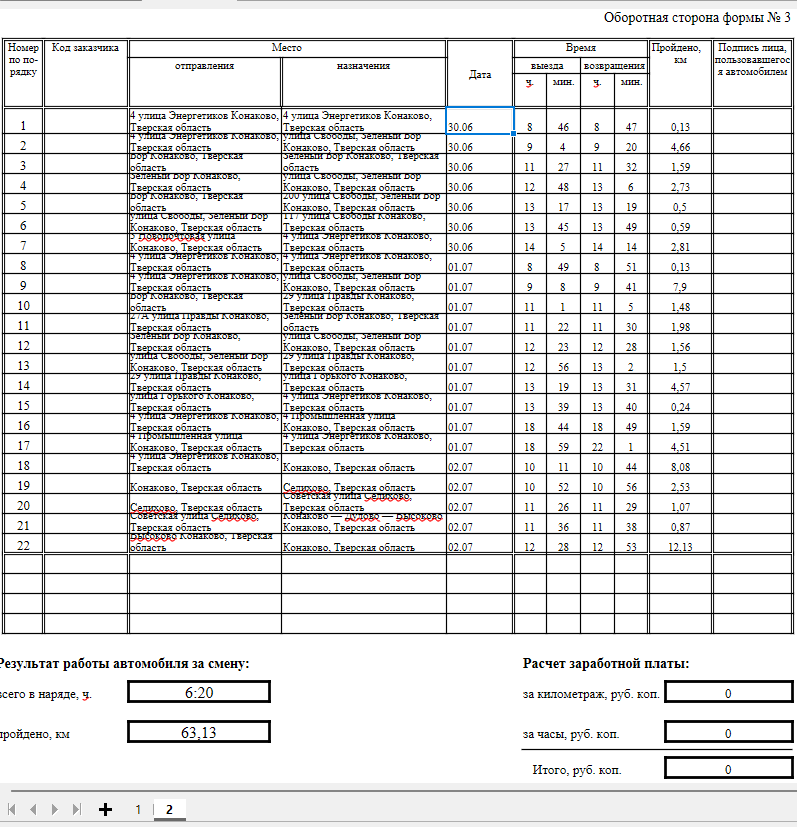
| Waybill field | Data source |
|---|---|
| Sequential number | Sequential row number. |
| Departure point | Initial location from the trip. |
| Destination point | Final location from the trip. |
| Date | Date from grouping. |
| Departure time | Trip start. |
| Return time | Trip end. |
| Distance traveled | Trip mileage. |
16. Work Result and Wage Calculation in Form No. 3
Form No. 3 includes the vehicle work result for the shift and wage calculation.
| Indicator | Source / calculation |
|---|---|
| Total time on duty, h | Duration. |
| Distance traveled, km | Mileage in the “Total” row. |
| Per mileage | Rate per km × distance traveled. |
| Per hours | Rate per hour × total time on duty, h. |
| Total | Final amount. |
17. Completing Form No. 4-C
Form No. 4-C is used for a truck waybill. It is filled with general data, vehicle and driver information, actual working time, odometer readings, fuel movement, work results, and wage calculation.
| Waybill field | Data source |
|---|---|
| Series / number | Mandatory “Series” and “Number” fields when generating the waybill. |
| Validity period | Interval start − interval end. |
| Organization | Organization name. |
| Vehicle make and model | Make and model from the vehicle card in the “Characteristics” section. |
| State registration plate | Vehicle name. |
| Driver | Full name of the driver linked to the vehicle at the time the waybill is generated. |
| License and issue date | Driver’s license series and number, as well as the issue date from the driver card. |
| SNILS | SNILS from the driver card linked to the vehicle at the time the waybill is generated. |
18.1. Driver and Vehicle Operation
| Field | Data source |
|---|---|
| Garage departure time | Start of the first trip in the interval. Filled in the “Actual time” section. |
| Garage return time | End of the last trip in the interval. Filled in the “Actual time” section. |
| Odometer reading at departure | Odometer reading at the start of the first trip. |
| Odometer reading upon return | Odometer reading at the end of the last trip. |
18.2. Fuel Movement
| Field | Data source |
|---|---|
| Balance at departure | Initial fuel level. |
| Balance upon return | Final fuel level. |
| Fuel grade | Fuel grade from the vehicle characteristics. |
| Engine operating time | Operating time according to the ignition sensor. |
19. Movement History in Form No. 4-C
For Form No. 4-C, a second sheet with movement history is also generated. The data is taken from the “Trips” table and arranged vertically.
The “Loading, unloading, and trailer recoupling points” block receives movement history based on trips, including arrival and departure data. Dates and times are taken from the trip sequence.
20. Vehicle and Trailer Work Results in Form No. 4-C
Form No. 4-C includes vehicle and trailer work results.
| Field | Data source |
|---|---|
| Normative fuel consumption | Consumption norm from the “Additional” section in the vehicle card. |
| Actual fuel consumption | Actual vehicle consumption per 100 km. |
| Time on duty | Total trip time. |
| Mileage | Total mileage by trips. |
| Wage | Rate per km × distance traveled. |
21. Recommended Workflow
Recommended waybill generation workflow:
- Check that the vehicle card contains the make, model, and fuel data.
- Check that a driver is linked to the vehicle.
- Check that the driver card contains the required data, including SNILS.
- Open the vehicle in the “Fleet” module.
- Click the “Generate Waybill” button.
- Select the waybill template.
- Select the reporting interval.
- Specify the waybill series and number.
- If necessary, enable trip data completion.
- If necessary, enable the use of odometer data.
- If necessary, specify data for wage calculation.
- Download the generated waybill.
22. Limitations and Important Conditions
- The waybill series and number are mandatory fields during generation.
- For trip data to be completed correctly, trips must exist for the selected interval.
- For driver data to be completed correctly, the driver must be linked to the vehicle at the time the waybill is generated.
- To fill in the make, model, and fuel data, the vehicle characteristics must be completed.
23. Summary
The “Waybills” section allows users to generate waybills using data from the “Fleet” module, vehicle cards, driver cards, and the service report. The user selects a template, sets a period, specifies the mandatory details, and downloads the completed document.
The main purpose of this functionality is to reduce manual waybill completion and use the data already accumulated in the system: trips, mileage, fuel, drivers, vehicle characteristics, and calculated indicators.